Confessions of an Economic Conservative
By then a streak of 60’s idealism convinced me that I wanted to become a senior high school English teacher, and my practicum experience teaching 11th and 12th grade English exceeded my hopes that I could make a difference in the lives of kids by exposing them to the power of language. This sense of purpose didn’t last long, as I quickly ran afoul of the local branch of the Pennsylvania State Teacher’s Association. A representative informed me that the union did not look kindly on how many hours I was spending after school helping students and meeting with parents, as it put undue pressure on regular teachers to do the same. I also received information on the union’s political positions, which included opposing English as the official language of the U.S., a position that in good conscience I could never support because I believe so strongly in the need for a common language as vital cultural glue.
So much for idealism . . .
By the time Jim finished
his MBA studies at Wharton and we got married and moved
to Annville, it was obvious that if I didn’t agree to
join the teacher’s union my life as a public school
teacher would be made miserable, so I decided to apply
for a position at a local college; I wasn’t looking for
a fight in those days. Many years later I would run up
against the union again—during a eight-year foray into
education politics—during which the confrontation
escalated from slashed tires to death threats and
finally to a physical attack by a union rep, which led
to his arrest. But that’s a story for another day.
The local college hired me as director of publications
(I was grossly under qualified), and later I was
promoted to director of public relations. These jobs
allowed me to finagle myself back into the classroom as
a part-time journalism instructor, advisor to the
school yearbook, and manager of several community
internship projects involving English students. All the
while I also did part-time feature writing for the
Harrisburg newspaper, which allowed me to illustrate my
stories with my own photographs. I had begun learning
photography from Jim, who had become a hobbyist in
graduate school, as well as from a very talented
student photographer with the yearbook. When I won a
local newspaper’s Kodak snapshot contest, I was
convinced I had what it takes to be a pro.
The original soccer mom?
By the mid-1970s I was one
of the few moms who kept on working after having kids,
and my after-hours writing and photography jobs allowed
me to purchase more equipment. I looked forward to the
day when I could quit my job at the college and build a
small studio in a garage that sat on the farm property
where we lived. I guess you could say that I was one of
the very first “soccer moms.” Those plans changed
dramatically when Jim came home one fine fall day
several years later and announced that he had decided
to quit his well-paying job as general manager of a
plastics company to help me start up my photography
business that he now intended to join. That decision,
which I fully supported, set into motion a series of
events that severely jeopardized our then pleasant way
of life and hopes for the future. In the process, I
learned a lot about the banking industry.
Most of my business students know the story of how I
came to owe $187,000 at 23% interest because of the bad
decisions we made investing borrowed money at a time
when America’s banking system was out of control and
inflation threatened every family’s way of life. During
this period, many hard-working farmers lost land that
had been in their families for generations.
Fund-raisers were held around the world for these
American farmers, who, like anyone who borrowed money
during this period, had been victimized by banks and
savings-and-loan institutions that racked up
commissions by convincing farmers and others like Jim
and me to keep on borrowing because the value of our
land was escalating, and it represented the vehicle by
which we should fulfill our dreams. When regulators got
nervous about this frenzy, lending institutions began
calling in loans, and the house of cards began to
collapse, precipitating what became known as the
Savings and Loan Crisis. If you want to read more about
the history of the origin and effects of this
debacle, click here. It illustrates that we’ve been
down this path before, and it begs the question: Why
are we repeating it again?
Surviving economic disaster
Jim and I were among the
fortunate few who survived this bleak period by
liquidating personal assets and working double shifts
in the studio so that we could pay down debt. Early on
I was fortunate enough to meet the late Bud Haynes, who
became my business mentor; he made me understand that
creating a business could be every bit as creative and
rewarding as making photographs. Eventually, Bud
recruited me to teach with him, which developed in me a
sense of calling because of my gratitude to him and
other PPA instructors who helped our business to
succeed. Furthermore, I had learned so much from the
School of Hard Knocks that I wanted to do what I could
to help others from making bad business decisions. The
experience also strengthened my awareness of the
importance of sticking to fundamental business
principles such as the importance of staying out of
debt, creating a plan for every aspect of your
business, and practicing fiscally conservative
oversight in all affairs of business and personal
finance. Having watched so much harm come from
government manipulation of markets also hardened my
belief in the wisdom of allowing free markets to
function, even if it creates financial pain and
hardship. Unfortunately pain sometimes is the ONLY path
to wisdom and progress.
If you’re still reading, I want you to know that I’ve
recounted this personal history as an explanation as to
why I have more than a passing interest in the state of
our economy. When the banking system began to implode
last fall, I began using what little spare time I had
to learn more about the worldwide banking system. (This
activity is the main reason that my blog has been so
quiet lately.) The more I studied, the more convoluted
the subject became, and I began to understand how a
nerdy guy like Bernie Madoff (whom the media
inexplicably calls “charming”) could cheat his clients
out of so many billions of dollars: When so few people
understand the complexities of international banking,
you can get away with almost anything . . . until the
Ponzi scheme finally plays out.
One thing has become abundantly clear to me: The same
kinds of greedy manipulators who orchestrated the
Savings and Loan debacle were alive and well and
flourishing in the 21st century, and if you peeked into
their business plans, you could find
government lending a helping
hand. I have no doubt that
government bureaucrats (under both Clinton and Bush
by the way) had very good intentions in promoting
and tolerating sub-prime loans: They wanted to
increase home ownership, a noble ideal to be sure. I
doubt if they envisioned the spectacle of houses
replacing land as the new free ride to the top. I’m
sure they regret cracking open the door for lenders
with visions of non-stop commission checks to break
it down.
Bad behavior with the color of money
As an unabashed advocate of
capitalism, it has been extremely discomforting to
witness the parade of capitalists—especially those in
the financial sector—behaving so badly; but I am
mindful that layers upon layers of government
bureaucracy make it so much easier for bad financial
behavior to go unnoticed. It is instructive to note
that it wasn’t the FBI that “got their man” with Bernie
Madoff; he turned himself in when his evil house of
cards began to flutter. With a few more layers of
bureaucracy, perhaps he would still be in business
“spreading the wealth.”
So for the last four months I’ve been looking to see
which way government would go in addressing our
financial crisis. The years I spent in politics made me
fairly cynical about politicians on both sides of the
aisle. It’s been pretty hard to tell a Republican from
a Democrat for a long time or even to define if there
is a “center” operating anywhere in the political
spectrum. I’ve been watching closely and hopefully, but
the recent unveiling of a so-called stimulus package,
followed up by the pork-laden omnibus spending bill
that represents an all-out assault on the business
sector, has set me to emailing and calling my elected
representatives. Their mindless responses have not
lifted my spirits.
So what’s next?
At this writing our
government seems hell-bent on repeating the mistakes of
the past: thinking the government can supplant the
private sector, and by sheer force of will and taxation
reverse what it helped to cause, using the same tactics
that precipitated the problem in the first place:
spending money we don’t have to subsidize failing
institutions; borrowing from nations who may not have
our best interest at heart; and targeting the “rich,”
so that government can orchestrate the next rocketing
bubble that will do what all bubbles eventually do:
burst when they have wreaked maximum havoc.
Most concerning of all is the prominent lack of a
concerted effort to attack the proximate causes of the
problem: housing and banking. Instead we are told that
we must undertake to fundamentally restructure
education, medical care, and the electric grid. Give me
a break! What I’ve heard from my elected
representatives is that we have no choice but to do so
because of the Mother of All Cop-Outs: “We are in
uncharted territory, so we need to act boldly and
swiftly.” In other words: We will exercise our
cluelessness by experimenting with your money and that
of your children and grandchildren. They have learned
NOTHING from the past.
Checking in with Dow Jones
So it is no surprise the
Great Global Financial Scorekeeper at the New York
Stock Exchange keeps heading south. I know it’s hard
for Main Street to care much about Wall Street these
days; I agree that these folks need to spend some time
in the national naughty chair. Jim and I got burned
twice by the Market, so we got out years ago when we
were sick of worrying about the market’s volatility and
how value could drop every time Alan Greenspan caught a
cold. But the most sobering fact of all to me is that
the financial wellbeing of more than half of America
and a lot of the world is tied to the stock market.
Consumers won’t regain confidence until the Market
rallies. So attention My Government: It’s about the
Market! It’s about the Houses! Tell the guy in charge
(who couldn’t figure out how to pay his self-employment
taxes) to pick up a book!
Also tell Mr. Geithner that it’s also about the small
business sector that powers economic progress in
America: Encourage us, then get out of our way! Don’t
tell us you will punish us if we get rich. Most small
business owners, such as photographers, will never hit
that magic $200,000 + income level in the proposed Tax
Code revisions where the government will start lowering
deductions for state and local taxes, mortgages, and
most cynical of all—charitable contributions. Just the
specter of economic punishment will rob small business
people of the desire to takes risks. As an economic
growth strategy, these proposals are about as foolish
as trying to strangle a hen in order to make her lay
more eggs.
Reading about the budget’s provisions has made me
wonder what I would be doing today if my parents hadn’t
encouraged me to sell potholders door to door when I
was six years old. What if they had told me that I
could do it, but I had to give them more than half of
what I earned? I suspect that single act would have
robbed me of the great gift of Hope.
When the history is written . . .
I don’t much like labels,
but I am just fine with being called an economic
conservative, because most of us who identify with this
mindset believe that if it looks too good to be true .
. . it simply IS too good to be true. We tend to trust
what we know to be true from personal experience and
what we can learn from history. When Enron collapsed, I
studied the reasons why. The reasons no longer matter:
what I learned is that if a company cannot explain to
you what it does to earn money in less than three
sentences, then you should not go to work for it or
invest in it. What I’ve learned so far about
accumulating wealth is that is fine to want to get
rich, but the best strategy is to get rich SLOWLY! And
you’d better have a plan to do so. What I’m afraid I
will be studying in the years to come is what happened
when the government couldn’t explain its economic
recovery plan in less than 1,000 pages and the Congress
voted it through the day they received it without
reading it.
I feel better now that I have gotten all this off my
chest. I’m finding that writing about my concerns is
cathartic. I don’t know whether I’ll write about this
subject again, but if I do, I promise to keep it short.
I’m learning every day, and perhaps I’ll pass on some
of the resources I’m looking at in case anyone out
there is interested.
Education in Atlanta
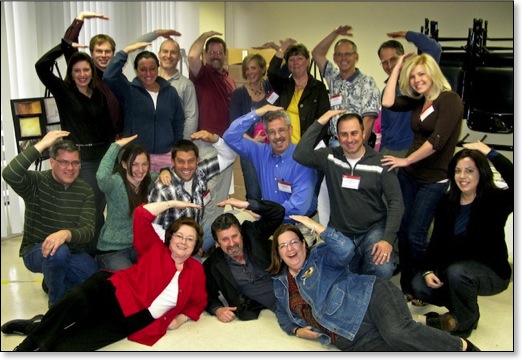
The Business Basics class was followed by a 3-Day Business Workshop, which moved in on Monday of last week. As you can see, we really enjoyed ourselves. Carol and I are shown with the class giving the business equivalent of a secret handshake. To learn what it’s all about, you’ll have to attend the next SMS 3-Day Business Workshop, which will take place in Atlanta on March 23-25 and will be taught by Carol Andrews and Julia Woods. I believe there are one or two spaces left.
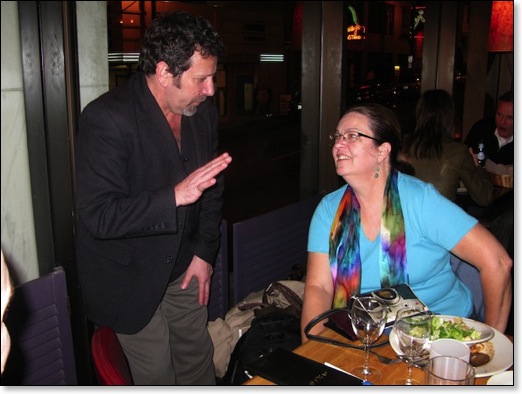
In the image below, Carol is deep in conversation with class member Fima Gelman. I generally don’t single out a photographer for comment, but I doubt if the rest of the class would mind: we all got a tremendous kick out of Fima, whose sense of humor makes him a most compelling character. Fima has a great story, as he immigrated to the United States when he was 17 years old. The Gelman family came here, by way of Israel, from their homeland in the Ukraine. You can see Fima’s gift of finding and expressing humor at San Francisco-area weddings by logging onto his website. From the home page click on Weddings, then click on Humor. I enjoyed looking at the rest of the site, especially the section entitled Project Hope, which displays Fima’s photographic essay about Siberia’s orphaned children. Great work, Fima!