Don't Miss This Great ProSelect Tutorial
July/02/2008 ProSelect
I want to thank Ron Nichols for sending me a link to his website where you can review an excellent ProSelect sales tutorial in which he takes you through the entire sales process using ProSelect, the incredible application that so many photographers recognize to be an indispensible sales tool. Ron really knows what he's talking about when it comes to maximizing sales and how to use ProSelect efficiently for both sales and workflow. Even if you're already using ProSelect, you'll benefit from seeing Ron's approach to sales and the organization of his salesroom environment, and you'll probably learn some ProSelect shortcuts and features that you might not know exist. Just click on this link to view the tutorial.
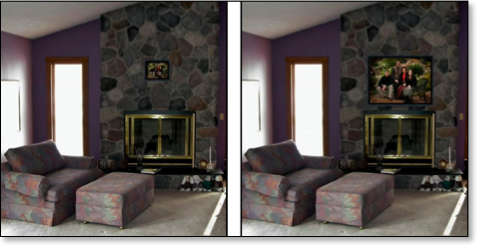
In it you'll see two of the great new features of ProSelect version 4.0, the ability to place frames around images, and the new "Room View" capability that allows you to show the client's framed image choice within a photograph of the room in which clients plan to display it. Or you can project it within your choice of a room setting such as above a fireplace or couch. These features add even more tools to help your clients make appropriate selections of their portrait images, as they can compare the impact of a properly sized image, such as the 30x40 portrait shown below at right, compared to the same image shown in 11x14 size at left.
While you're on Ron's site, take a look at his outstanding palette tools that increase your workflow speed and artistic ability. They have been absolutely instrumental to the improvement of my digital skills.
In it you'll see two of the great new features of ProSelect version 4.0, the ability to place frames around images, and the new "Room View" capability that allows you to show the client's framed image choice within a photograph of the room in which clients plan to display it. Or you can project it within your choice of a room setting such as above a fireplace or couch. These features add even more tools to help your clients make appropriate selections of their portrait images, as they can compare the impact of a properly sized image, such as the 30x40 portrait shown below at right, compared to the same image shown in 11x14 size at left.
While you're on Ron's site, take a look at his outstanding palette tools that increase your workflow speed and artistic ability. They have been absolutely instrumental to the improvement of my digital skills.